
Quick Start#
This page will show some examples to load a sourced dataset or to make quicklook plots. For more details, please refer to the user manual.
More examples can be found here.
Use the Datahub and Dock a Dataset#
The example below shows how to dock a sourced dataset (Madrigal/EISCAT data) to a datahub. Please refer to the list of the data sources for loading other geospace data.
Use the Time-Series Viewer and Create a Figure#
Add Indicators#
Use the Geomap Viewer and Create a Map#
Use the Express Viewer and Create a Figure#
The quicklook plots are produced by the method “quicklook” of a viewer,
which is custom-designed for a data source. Those specialized viewer can be imported
from geospacelab.express. The two examples below show the solar wind and geomagnetic
indices, as well as the EISCAT data, respectively.
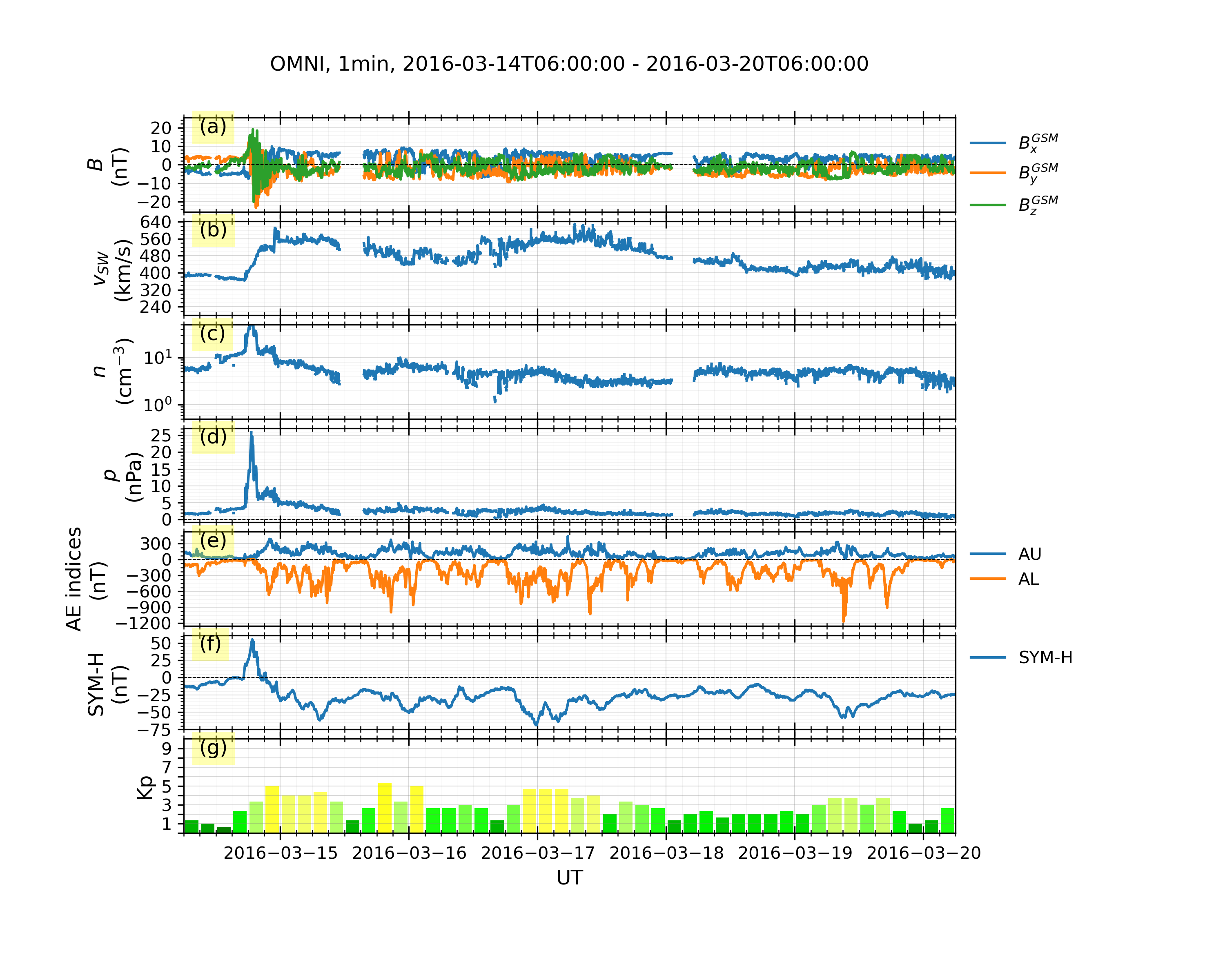
Solar Wind and Geomagnetic Indices from OMNI and WDC#
Solar wind and geomagnetic indices data
examples/demo_omni_data.py## Licensed under the BSD 3-Clause License # Copyright (C) 2021 GeospaceLab (geospacelab) # Author: Lei Cai, Space Physics and Astronomy, University of Oulu __author__ = "Lei Cai" __copyright__ = "Copyright 2021, GeospaceLab" __license__ = "BSD-3-Clause License" __email__ = "lei.cai@oulu.fi" __docformat__ = "reStructureText" import datetime import geospacelab.express.omni_dashboard as omni dt_fr = datetime.datetime.strptime('20160321' + '0600', '%Y%m%d%H%M') dt_to = datetime.datetime.strptime('20160330' + '0600', '%Y%m%d%H%M') omni_type = 'OMNI2' # 'OMNI' or 'OMNI2' omni_res = '1min' # '1min' or '5min' load_mode = 'AUTO' dashboard = omni.OMNIDashboard( dt_fr, dt_to, omni_type=omni_type, omni_res=omni_res, load_mode=load_mode ) # data can be retrieved in the same way as in Example 1: dashboard.list_assigned_variables() B_x_gsm = dashboard.get_variable('B_x_GSM', dataset_index=0) # Omni dataset index is 1 in the OMNIDashboard. To check other dashboards, use the method "list_datasets()" print(B_x_gsm) dashboard.quicklook() dashboard.list_assigned_variables() # save figure dashboard.save_figure()
Output:
EISCAT from Madrigal with Marking Tools#
examples/demo_eiscat_quicklook.py#1# Licensed under the BSD 3-Clause License 2# Copyright (C) 2021 GeospaceLab (geospacelab) 3# Author: Lei Cai, Space Physics and Astronomy, University of Oulu 4 5__author__ = "Lei Cai" 6__copyright__ = "Copyright 2021, GeospaceLab" 7__license__ = "BSD-3-Clause License" 8__email__ = "lei.cai@oulu.fi" 9__docformat__ = "reStructureText" 10 11import datetime 12import geospacelab.express.eiscat_dashboard as eiscat 13 14dt_fr = datetime.datetime.strptime('20201209' + '1800', '%Y%m%d%H%M') 15dt_to = datetime.datetime.strptime('20201210' + '0600', '%Y%m%d%H%M') 16 17site = 'UHF' 18antenna = 'UHF' 19pulse_code = 'beata' 20modulation = '' 21load_mode = 'AUTO' 22dashboard = eiscat.EISCATDashboard( 23 dt_fr, dt_to, site=site, antenna=antenna, modulation=modulation, load_mode='AUTO', 24 data_file_type="madrigal-hdf5" 25) 26dashboard.quicklook() 27 28# dashboard.save_figure() # comment this if you need to run the following codes 29# dashboard.show() # comment this if you need to run the following codes. 30 31""" 32As the dashboard class (EISCATDashboard) is a inheritance of the classes Datahub and TSDashboard. 33The variables can be retrieved in the same ways as shown in Example 1. 34""" 35n_e = dashboard.assign_variable('n_e') 36print(n_e.value) 37print(n_e.error) 38 39""" 40Several marking tools (vertical lines, shadings, and top bars) can be added as the overlays 41on the top of the quicklook plot. 42""" 43# add vertical line 44dt_fr_2 = datetime.datetime.strptime('20201209' + '2030', "%Y%m%d%H%M") 45dt_to_2 = datetime.datetime.strptime('20201210' + '0130', "%Y%m%d%H%M") 46dashboard.add_vertical_line(dt_fr_2, bottom_extend=0, top_extend=0.02, label='Line 1', label_position='top') 47# add shading 48dashboard.add_shading(dt_fr_2, dt_to_2, bottom_extend=0, top_extend=0.02, label='Shading 1', label_position='top') 49# add top bar 50dt_fr_3 = datetime.datetime.strptime('20201210' + '0130', "%Y%m%d%H%M") 51dt_to_3 = datetime.datetime.strptime('20201210' + '0430', "%Y%m%d%H%M") 52dashboard.add_top_bar(dt_fr_3, dt_to_3, bottom=0., top=0.02, label='Top bar 1') 53 54# save figure 55dashboard.save_figure() 56# show on screen 57dashboard.show()
Output:

DMSP/SSUSI auroral images#
examples/demo_dmsp_ssusi_single_panel.py#1# Licensed under the BSD 3-Clause License 2# Copyright (C) 2021 GeospaceLab (geospacelab) 3# Author: Lei Cai, Space Physics and Astronomy, University of Oulu 4 5__author__ = "Lei Cai" 6__copyright__ = "Copyright 2021, GeospaceLab" 7__license__ = "BSD-3-Clause License" 8__email__ = "lei.cai@oulu.fi" 9__docformat__ = "reStructureText" 10 11 12import datetime 13import pathlib 14import matplotlib.pyplot as plt 15from pexpect import which 16 17# from geospacelab import preferences as pref 18# pref.user_config['visualization']['mpl']['style'] = 'dark' 19import geospacelab.visualization.mpl.geomap.geodashboards as geomap 20 21 22cwd = pathlib.Path(__file__).parent.resolve() 23 24def test_ssusi(): 25 dt_fr = datetime.datetime(2015, 9, 8, 8) 26 dt_to = datetime.datetime(2015, 9, 8, 23, 59) 27 time_c = datetime.datetime(2015, 9, 8, 20, 21) 28 pole = 'N' 29 sat_id = 'f16' 30 band = 'LBHS' 31 32 # Create a geodashboard object 33 dashboard = geomap.GeoDashboard(dt_fr=dt_fr, dt_to=dt_to, figure_config={'figsize': (5, 5)}) 34 35 # If the orbit_id is specified, only one file will be downloaded. This option saves the downloading time. 36 # dashboard.dock(datasource_contents=['jhuapl', 'dmsp', 'ssusi', 'edraur'], pole='N', sat_id='f17', orbit_id='46863') 37 # If not specified, the data during the whole day will be downloaded. 38 ds_ssusi = dashboard.dock(datasource_contents=['cdaweb', 'dmsp', 'ssusi', 'edr_aur'], pole=pole, sat_id=sat_id, orbit_id=None) 39 ds_s1 = dashboard.dock( 40 datasource_contents=['madrigal', 'satellites', 'dmsp', 's1'], 41 dt_fr=time_c - datetime.timedelta(minutes=45), 42 dt_to=time_c + datetime.timedelta(minutes=45), 43 sat_id=sat_id, replace_orbit=True) 44 45 dashboard.set_layout(1, 1) 46 47 # Get the variables: LBHS emission intensiy, corresponding times and locations 48 lbhs = ds_ssusi['GRID_AUR_' + band] 49 dts = ds_ssusi['DATETIME'].flatten() 50 mlat = ds_ssusi['GRID_MLAT'] 51 mlon = ds_ssusi['GRID_MLON'] 52 mlt = ds_ssusi['GRID_MLT'] 53 54 # Search the index for the time to plot, used as an input to the following polar map 55 ind_t = dashboard.datasets[0].get_time_ind(ut=time_c) 56 if (dts[ind_t] - time_c).total_seconds()/60 > 60: # in minutes 57 raise ValueError("The time does not match any SSUSI data!") 58 lbhs_ = lbhs.value[ind_t] 59 mlat_ = mlat.value[ind_t] 60 mlon_ = mlon.value[ind_t] 61 mlt_ = mlt.value[ind_t] 62 # Add a polar map panel to the dashboard. Currently the style is the fixed MLT at mlt_c=0. See the keywords below: 63 panel = dashboard.add_polar_map( 64 row_ind=0, col_ind=0, style='mlt-fixed', cs='AACGM', 65 mlt_c=0., pole=pole, ut=time_c, boundary_lat=55., mirror_south=True 66 ) 67 68 # Some settings for plotting. 69 pcolormesh_config = lbhs.visual.plot_config.pcolormesh 70 # Overlay the SSUSI image in the map. 71 ipc = panel.overlay_pcolormesh( 72 data=lbhs_, coords={'lat': mlat_, 'lon': mlon_, 'mlt': mlt_}, cs='AACGM', **pcolormesh_config, regridding=False) 73 # Add a color bar 74 panel.add_colorbar(ipc, c_label=band + " (R)", c_scale=pcolormesh_config['c_scale'], left=1.1, bottom=0.1, 75 width=0.05, height=0.7) 76 77 # Overlay the gridlines 78 panel.overlay_gridlines(lat_res=5, lon_label_separator=5) 79 80 # Fill land area in the AACGM coordinate 81 panel.overlay_lands( edge_color=None, fill_color='tan', zorder=1, alpha=0.3 ) 82 83 # Overlay the coastlines in the AACGM coordinate 84 panel.overlay_coastlines() 85 86 # Overlay cross-track velocity along satellite trajectory 87 sc_dt = ds_s1['SC_DATETIME'].value.flatten() 88 sc_lat = ds_s1['SC_GEO_LAT'].value.flatten() 89 sc_lon = ds_s1['SC_GEO_LON'].value.flatten() 90 sc_alt = ds_s1['SC_GEO_ALT'].value.flatten() 91 sc_coords = {'lat': sc_lat, 'lon': sc_lon, 'height': sc_alt} 92 93 v_H = ds_s1['v_i_H'].value.flatten() 94 panel.overlay_cross_track_vector( 95 vector=v_H, unit_vector=1000, vector_unit='m/s', alpha=0.3, color='red', 96 sc_coords=sc_coords, sc_ut=sc_dt, cs='GEO', 97 ) 98 # Overlay the satellite trajectory with ticks 99 panel.overlay_sc_trajectory(sc_ut=sc_dt, sc_coords=sc_coords, cs='GEO') 100 101 # Overlay sites 102 panel.overlay_sites( 103 site_ids=['TRO', 'ESR'], coords={'lat': [69.58, 78.15], 'lon': [19.23, 16.02], 'height': 0.}, 104 cs='GEO', marker='^', markersize=2) 105 106 # Add the title and save the figure 107 polestr = 'North' if pole == 'N' else 'South' 108 panel.add_title(title='DMSP/SSUSI, ' + band + ', ' + sat_id.upper() + ', ' + polestr + ', ' + time_c.strftime('%Y-%m-%d %H%M UT')) 109 110 file_dir = cwd 111 file_name = 'DMSP_SSUSI_' + time_c.strftime('%Y%m%d-%H%M') + '_' + band + '_' + sat_id.upper() + '_' + pole 112 dashboard.save_figure(file_dir=file_dir, file_name=file_name, dpi=300) 113 # Alternatively, you can also save the figure by plt.savefig 114 # plt.savefig(cwd / ('DMSP_SSUSI_' + time_c.strftime('%Y%m%d-%H%M') + '_' + band + '_' + sat_id.upper() + '_' + pole), dpi=300) 115 116 # show the figure 117 dashboard.show() # the dashboard.show() is recommended, 118 # plt.show() 119 120 121if __name__ == "__main__": 122 test_ssusi()
Output:
